



Between work, school, appointments and everything else, we were constantly forgetting things. KinSync has made it so much easier having everything in one spot.
KinSync - White 15.6"
KinSync - White 15.6"
Regular price
$499.00
Regular price
$499.00
Sale price
$715.00
Unit price
per
🧠 Less mental load
👨👩👧👦 Keep the whole family in sync
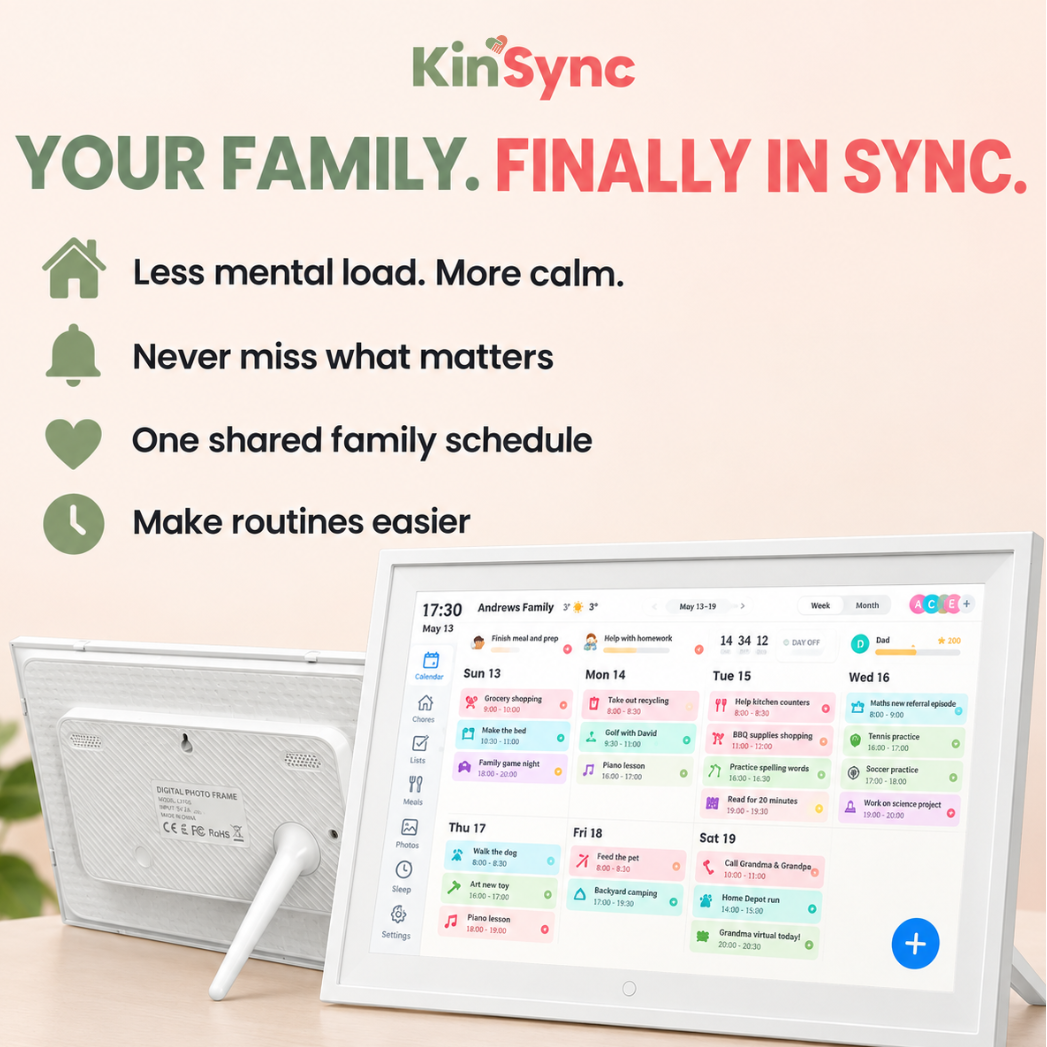
📅 All your calendars in one place
✅ Shared chore chart, to-do list & meal planner built in
📸Doubles as a digital photo frame
⚡ Set up in minutes
Couldn't load pickup availability
KinSync - White 15.6"
Regular price
$499.00
Regular price
$499.00
Sale price
$715.00
Unit price
per
Get it between - and -.
30% OFF for a limited time 🎉
30% OFF for a limited time 🎉
Get the family organised for less. Your discount is automatically applied - no code needed.
Specifications
Specifications
📅 Your Family’s Schedule, All in One Place
KinSync brings your family calendar, planner, chores and to-do lists together on one easy-to-use screen. Switch between daily, weekly and monthly views so everyone knows what’s happening and what needs to be done.
🔄 Sync the Calendars You Already Use
Simply plug in KinSync, connect to Wi-Fi and sync your existing calendars. Your events appear automatically and stay updated across your devices. KinSync supports Google Calendar, Apple/iCloud Calendar, Outlook, Cozi and Yahoo Calendar.
✨ 15.6" Full HD Touchscreen
See everything clearly on a vibrant 15.6-inch 1920 × 1080 IPS touchscreen. Whether you're checking tomorrow's plans, ticking off chores or displaying your favourite family photos, KinSync is designed to look beautiful in the heart of your home.
✅ Chores, To-Dos & Meal Planning
Keep more than appointments organised. Create and manage household chores, tasks and meal plans, helping everyone know what needs doing without the constant reminders.
📱 Manage It From Your Phone
Plans changed while you're out? No problem. Using the compatible FotoCube app, you can add and manage activities, chores and meal plans from your phone, making it easy to keep your household up to date wherever you are.
📸 A Digital Photo Frame Too
When you're not checking the family schedule, KinSync doubles as a Wi-Fi digital photo frame. Share your favourite memories and send photos to the display remotely - keeping the people you love front and centre.
🌎 Supports 18 Languages
KinSync supports 18 languages, including English, Spanish, French, German, Italian, Portuguese, Japanese, Korean and more - making it easy for households around the world to stay connected and organised.
What's included?
What's included?
1 × KinSync 15.6" Smart Family Calendar
1 × Desktop Display Stand
1 × Power Adapter (Plug of Choice)
1 × Instruction Manual
Shipping Details
Shipping Details
All orders are processed within 1-3 days.
Delivery times vary between 3-14 business days.
Returns & Refunds
Returns & Refunds
At KinSync, we stand behind the quality of our products, that's why we have a 30-day satisfaction guarantee. If you're not completely satisfied with your purchase, we'll give you a full refund within 30 days.


30 Days RISK-FREE!
If you're not completely satisfied with your product, you have 30 days to return it for a full refund. Simply contact our customer service team to initiate the return process. We aim to make your return process as smooth & hassle-free as possible.

Your whole family, in sync
Bring everyone’s schedules, chores, to-do lists and meal plans together in one simple place. KinSync connects with popular calendars like Google, iCloud, Outlook, Cozi and Yahoo, so plans stay updated and easy for the whole household to see.
More than just a calendar
With a crisp 15.6” HD touchscreen, KinSync doubles as a digital photo frame when you’re not planning your week. Add and manage activities from your phone, share favourite family photos, and keep the people and moments that matter at the heart of your home.

How does KinSync work?
1. 🔌 Plug in & connect
Plug your KinSync into power, connect to Wi-Fi and follow the simple on-screen setup.
2. 📅 Sync your calendars
Connect the calendars your family already uses, including Google Calendar, Apple/iCloud, Outlook, Cozi and Yahoo. Your events appear together in one convenient place.
3. 👨👩👧👦 Get the whole family in sync
See upcoming events, add chores and to-dos, organise meals and keep everyone on the same page - all from one central family hub.
📸 And when you're not planning?
KinSync doubles as a digital photo frame, displaying your favourite family memories.
FAQ
Which calendars can I sync with KinSync?
Which calendars can I sync with KinSync?
KinSync works with popular calendar platforms including Google Calendar, Apple iCloud Calendar, Outlook, Cozi and Yahoo Calendar, bringing everyone’s schedules together in one easy-to-see place.
Do I need to pay a monthly subscription?
Do I need to pay a monthly subscription?
No! Unlike other digital calendars on the market, KinSync has no monthly subscription fees. Simply purchase your KinSync, set it up and start organising.
How easy is KinSync to set up?
How easy is KinSync to set up?
Super easy. Simply plug in your KinSync, connect to Wi-Fi and sync your calendar. Your events will automatically appear on your KinSync display.
Can multiple family members use KinSync?
Can multiple family members use KinSync?
Absolutely! KinSync is designed with busy households in mind. You can keep track of different family members' schedules, chores, tasks and plans all from one central screen.
Does KinSync need Wi-Fi?
Does KinSync need Wi-Fi?
Yes. KinSync connects to Wi-Fi to sync your calendars and keep your information up to date.
What else can I use KinSync for besides a calendar?
What else can I use KinSync for besides a calendar?
A lot! KinSync combines a digital calendar, chore chart, to-do list and meal planner in one place. You can also use it as a digital photo frame to display your favourite family photos.
-
National Leader
Over 8000 orders shipped nationally